Clay Cutter STL File - Pentagram 1: Optimizing Your Whimsigoth Designs
The resurgence of whimsigoth aesthetics has created a significant demand for specific, high-quality tools in the polymer clay and baking communities. The Clay Cutter STL File - Pentagram 1 addresses this niche by offering a versatile digital solution for creators who want to produce professional-grade earrings, pendants, barrettes, and seasonal cookies without relying on generic, mass-produced molds. Unlike physical cutters that may warp during shipping or lack precision, this digital download bundle empowers you to manufacture your own tools tailored to exact specifications.
However, possessing an STL file is only the first step. Many makers encounter frustration not because the design is flawed, but because they misunderstand the technical relationship between printer settings, cutter geometry, and material behavior. To get the most out of this pentagram design pack, it is essential to approach the printing and usage process with technical intention rather than assuming all STL files perform identically.
Selecting the Correct Blade Profile for Your Medium
A common oversight when downloading cutter bundles is treating all cutting edges as interchangeable. This specific pack includes two distinct cutter types, and choosing the wrong one for your intended application can lead to jagged edges, excessive cleanup time, or structural failure of the finished piece.
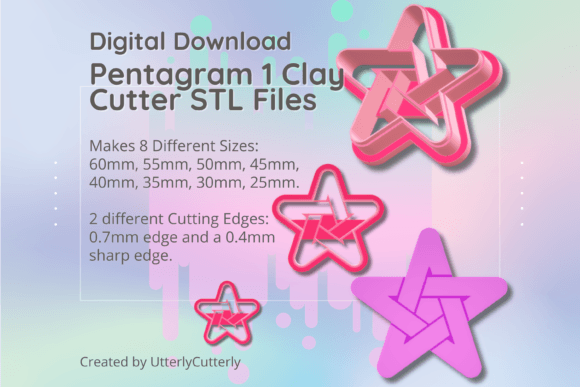
- The 0.7mm Wall Variant: This cutter features a 0.7mm wall thickness with a 3mm base and 12mm height. It is designed primarily for durability and ease of printing. If you are new to 3D printing or working with softer clays that do not require razor-sharp definition, this is often the safer starting point. It prints faster and is less prone to layer separation.
- The Sharp Edge (SE) Variant: Abbreviated as SE in the file names, this version utilizes a 1mm support wall tapering to a precise 0.4mm cutting edge. While superior for achieving crisp, clean lines in polymer clay and fondant, it requires meticulous printer calibration. Using the SE variant on uncalibrated printers often results in fragile edges that snap under pressure.
Makers frequently default to the Sharp Edge version expecting better results automatically, only to find the blade too delicate for their current setup. Conversely, using the standard 0.7mm wall for intricate cookie detailing can result in rounded corners that require significant hand-carving to correct. Always match the blade profile to both your printer’s capabilities and the stiffness of your medium.
Understanding Size Scaling and Measurement Standards
This bundle provides eight distinct sizes ranging from 25mm to 60mm. A frequent source of dissatisfaction arises from misunderstanding how these sizes are measured. The dimensions listed refer to the longest ends of the pentagram shape, not the width of the inner negative space or the bounding box.
When curating custom earring sets or coordinating jewelry collections, failing to account for this measurement standard can disrupt visual balance. For example, a 40mm pentagram cutter does not yield a 40mm wide earring; it yields a shape where the longest diagonal point-to-point distance is 40mm. Before committing to a full production run, print a single test cutter at your target size and measure the actual output against your design mockups. This verification step prevents wasted filament and ensures your sizing aligns with hardware findings like earring posts or pendant bails.
Navigating Embossing Lines and Clay Thickness
For those utilizing the embossing features within the design, ignoring material thickness constraints is a critical error. Any embossing lines in this file are set to a height of 10.5mm. This specification is non-negotiable for functional success.
If you attempt to use these cutters on clay sheets thinner than 1.5mm, the embosser will likely bottom out against your work surface before creating a clear impression, or worse, tear through the clay entirely. This results in ruined material and potential damage to your cutting mat. Always condition and roll your clay to a consistent thickness greater than 1.5mm when using the embossing function. For standard cutting without embossing, thinner gauges are acceptable, but the dual-function nature of this tool demands awareness of its geometric limits.
Printer Calibration and Material Considerations
Digital files are perfect; physical prints are subject to mechanical variables. Even with a high-resolution resin or FDM printer, dimensional accuracy must be verified. PLA and PETG filaments shrink slightly upon cooling, which can alter the final size of your pentagram cutter by fractions of a millimeter. In jewelry making, these fractions matter.
Rather than assuming the STL dimensions are absolute post-print, establish a baseline for your specific printer and filament combination. Print a calibration cube or a test ring alongside your first cutter batch. If your printer consistently shrinks parts by 2%, apply a compensatory scale factor in your slicer software before printing the entire size range. This proactive adjustment ensures that your 30mm cutter actually produces 30mm shapes, maintaining consistency across your product line.
Maximizing Versatility Across Applications
While marketed heavily toward the whimsigoth jewelry crowd, limiting this toolset solely to polymer clay overlooks its value in culinary applications. The same geometric precision that creates sharp earring edges also produces defined fondant decorations and cookie outlines. However, food safety protocols differ significantly from craft safety.
If you intend to use these cutters for cookies or fondant, dedicate specific prints exclusively to food use. Do not alternate between clay and food with the same cutter, as polymer clay residues and micro-abrasions can harbor bacteria. Furthermore, verify that your filament is certified food-safe and that your nozzle is stainless steel rather than brass if producing items for consumption. The versatility of the Clay Cutter STL File - Pentagram 1 is immense, but responsible usage requires separating your crafting and culinary workflows to maintain safety standards.
Evaluating Digital Assets Before Purchase
Before adding this bundle to your library, confirm that your current hardware supports the required resolution. The Sharp Edge variants demand fine detail reproduction that older or poorly maintained printers may struggle to achieve. Reviewing sample prints from other users or testing a free sample file from the store can provide realistic expectations.
Additionally, consider your post-processing workflow. Cutters with thinner walls may require careful sanding to remove layer lines that could otherwise transfer texture onto your clay. Factor in the time required for finishing when calculating production costs. Digital downloads offer incredible customization and weekly fresh designs, but they shift the manufacturing burden to you. Approaching this transition with calibrated equipment and realistic expectations transforms potential frustration into a sustainable, creative advantage.